.png)
%20How%20to%20Sell%20on%20Blinkit%20Successfully.webp)
India's quick commerce market hit ₹11,000 crore in a single month in early 2026 - roughly doubling year on year. Blinkit, owned by Eternal Limited (formerly Zomato), sits at the centre of that growth with approximately 46% market share, 2,200+ dark stores across 150+ cities, and over 2 million daily orders. For FMCG brands, D2C sellers, grocery manufacturers, and distributors, it is now the most powerful urban distribution channel available in India.
But Blinkit does not work like Amazon or Flipkart. There is no self-serve listing portal where you upload products and wait for orders to arrive. Blinkit raises Purchase Orders against your inventory, stocks it in their dark stores, and retails it directly to customers. Getting into that system requires passing category manager approvals, choosing the right commercial model, completing APOB GST registration, and meeting strict catalogue compliance standards - none of which are obvious if you are new to quick commerce.
This guide covers everything you need: eligibility, documents, commercial models, the full step-by-step process, common mistakes, and how to grow consistently after going live - all updated for 2026.
1. Why Sell on Blinkit India in 2026
Blinkit's Gross Order Value grew 134% year-on-year to ₹9,421 crore in Q4 FY25 alone. The platform's average order value exceeds ₹650 - higher than any competing quick commerce platform - and it is climbing as Blinkit expands into electronics, beauty, and premium grocery categories.
Unlike Amazon or Flipkart where buyers browse across multiple sessions before purchasing, Blinkit customers open the app because they need something right now. Conversion intent is structurally higher, and repeat purchase frequency is stronger.
For sellers, the business case is direct. Blinkit's dark store network handles all picking, packing, and last-mile delivery. Your only operational responsibility is supplying inventory to their stores.
You gain distribution across 150+ cities without building any delivery infrastructure of your own. Brands that entered their product categories on Blinkit early are now generating consistent, recurring B2B revenue through repeat purchase orders every week - with none of the customer acquisition or logistics overhead that traditional retail demands.
The window for first-mover advantage in most categories is still open, but it is narrowing as more brands complete their Blinkit seller onboarding every month and establish category rankings ahead of later entrants.
2. How Blinkit's Seller Model Actually Works
This is the most important section to read before you start - and the one most guides skip entirely.
Blinkit is not a marketplace. It is a B2B buyer.
When you sell on Blinkit, you are not listing products for consumers to purchase from you directly. Instead, Blinkit raises Purchase Orders (POs) against your inventory at an agreed trade price, stores the stock in their dark stores under their own GSTIN, and retails it to end customers.
You are functioning as a supplier to Blinkit - not as a marketplace seller competing for consumer clicks.
Three practical things every seller needs to understand from this:
- Your revenue comes from POs, not individual consumer orders. Blinkit issues periodic purchase orders. You fulfil those to their dark stores or fulfilment centres.
- Blinkit controls the retail price shown to customers. You negotiate a supply price; they set or approve the MRP visible in the app. Pricing strategy in your commercial negotiation matters significantly.
- Your seller dashboard shows supply-side metrics, not retail transactions. Key numbers to watch are PO fill rates, inventory levels at dark stores, and sell-through velocity - not individual consumer orders.
This model is different from standard e-commerce, but it creates something valuable once you are established: a predictable, scalable B2B revenue stream driven by Blinkit's growing order volumes rather than your own marketing spend.
3. Who Can Sell on Blinkit
Blinkit runs a curated onboarding process and does not accept every applicant. The platform screens for supply reliability, compliance standards, and category fit. The following business types are eligible:
- Manufacturers and producers - Direct manufacturers of FMCG, packaged food, beverages, personal care, or home care products. This is the cleanest route with the fewest documentation requirements beyond core business docs.
- Brand owners - Businesses with a registered trademark (or application in progress) can list own-label products directly and retain full control over listings and pricing.
- Authorised distributors - Can sell on behalf of brands, provided they hold a valid brand authorisation letter on the brand's official letterhead specifically naming Blinkit.
- D2C brands - Own-label products with GS1 barcodes, proper packaging labelling, and MRP printed on pack are eligible regardless of business size.
- Importers - With a valid IEC code and relevant product certifications for the imported product line.
4. Documents Required for Blinkit Seller Account
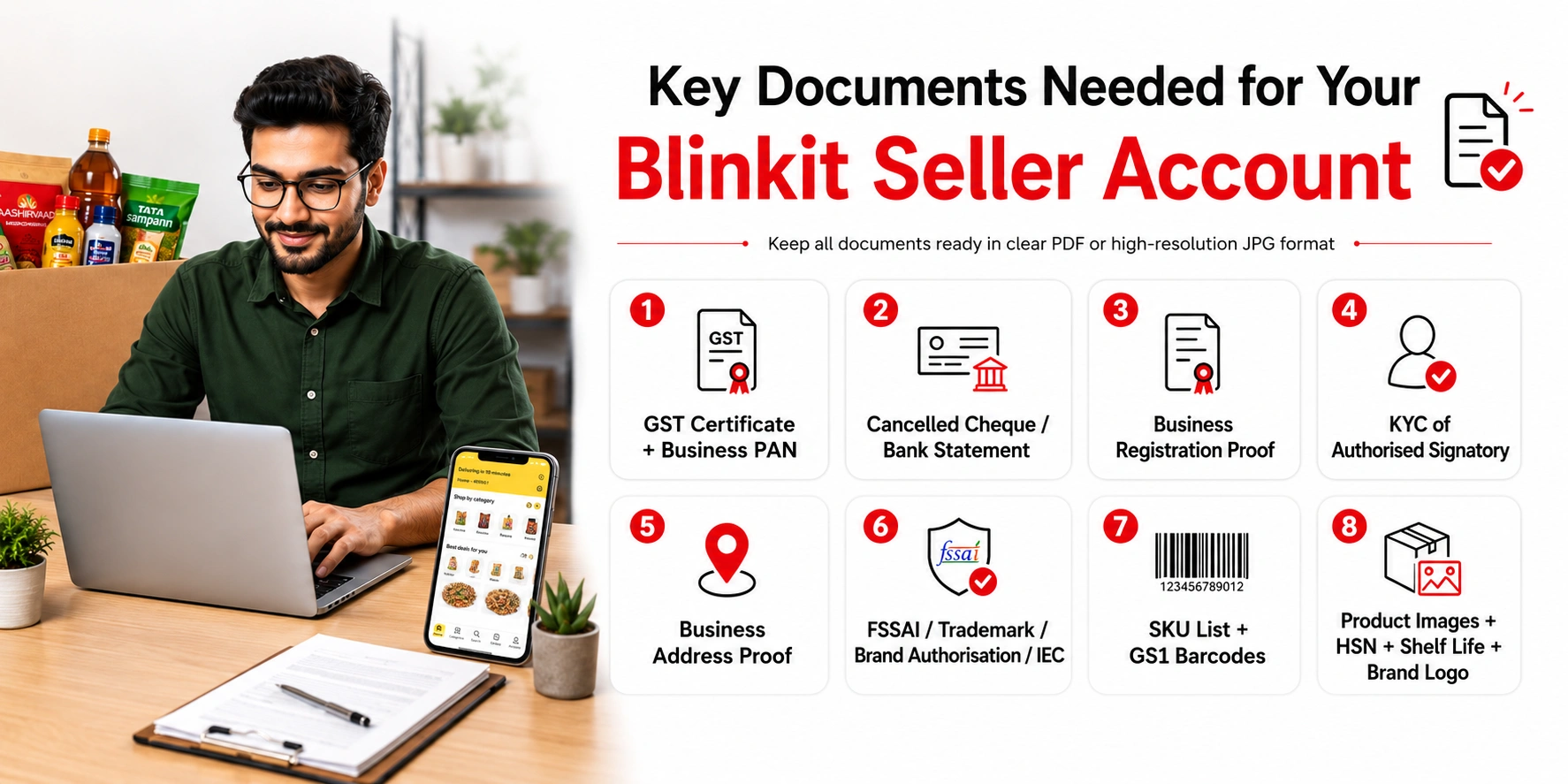 Document accuracy is the single biggest variable in how quickly your Blinkit seller
account gets approved. A name mismatch between your GST certificate and PAN card - even
one extra character - can push your application back by 15 to 30 days. Prepare every
document in clear PDF or high-resolution JPG format before you open the registration
form.
Document accuracy is the single biggest variable in how quickly your Blinkit seller
account gets approved. A name mismatch between your GST certificate and PAN card - even
one extra character - can push your application back by 15 to 30 days. Prepare every
document in clear PDF or high-resolution JPG format before you open the registration
form.
Business Documents:
- GST Certificate (GSTIN) - active 15-digit number; business name must match exactly across all documents
- Business PAN Card - entity name must be identical to the GST certificate
- Cancelled cheque or bank statement (last 3 months) in the same registered business name
- Business registration proof - Certificate of Incorporation, Udyam Certificate, Partnership Deed, or Proprietorship registration depending on your entity type
- KYC of authorised signatory - Aadhar and PAN of the director, partner, or proprietor
- Business address proof - rent agreement or ownership document for registered premises
Category-Specific Documents:
- FSSAI Licence - mandatory for all food, beverage, dairy, and edible product sellers; must be valid with more than 3 months of validity remaining at time of submission
- Trademark certificate or TM application acknowledgment - required for brand owners listing under a registered brand
- Brand authorisation letter - distributors must provide this on the brand's official letterhead, explicitly mentioning Blinkit as an authorised selling channel
- IEC Code - for imported product lines only
Product and Catalogue Documents:
- Full SKU list with product names, pack sizes, MRP, and intended supply price
- Valid GS1 EAN barcodes for every SKU - self-generated or non-GS1 barcodes are not accepted
- Minimum 3 product images per SKU at high resolution (front, back/info label, lifestyle or in-use shot)
- HSN codes for all products
- Shelf life information per SKU - total shelf life and minimum remaining life at time of inwarding
- Brand logo in PNG or JPG at 576 × 576 pixels
If you want your documents pre-checked before they reach Blinkit's compliance team, Arvian's seller onboarding service runs a full audit on every document - checking names, GSTIN status, FSSAI validity, and image quality - before your application is submitted.
5. SOR vs OR: The Two Commercial Models on Blinkit
Most seller guides skip this section entirely. It is the most commercially important thing to understand before you sign any agreement with Blinkit. The two models have fundamentally different cost structures, risk profiles, and margin implications.
SOR - Sale or Return
SOR is the standard entry model for new and emerging brands on Blinkit. Under SOR, you pay Blinkit a PLA (Product Listing Advertisement) deposit of ₹25,000 per SKU per city cluster. Blinkit credits this back to you as mandatory in-app advertising spend - it is not a cash refund.
Unsold inventory can be returned to you. Initial PO sizes are smaller as Blinkit tests how well your products sell before committing to larger volumes. The key risk under SOR is slow sell-through: if your products don't move quickly, ageing deductions and storage costs erode your margins.
OR - Outright Purchase
The OR model is available to brands that have demonstrated consistent sales velocity on Blinkit. Under OR, Blinkit purchases your inventory outright at NPI (Net Purchase Invoice) pricing.
There is no PLA deposit, no stock returns, and PO volumes are significantly larger. Margins improve and working capital cycles become more efficient. OR is an earned model - it is typically offered after sustained performance under SOR.
The calculation most sellers miss: If you have 5 SKUs targeting 3 city clusters under SOR, your PLA commitment at entry is ₹3,75,000 locked into ad credits. This is not a fee - but it is working capital tied up from day one. Sellers who sign commercial terms without calculating this figure across all their SKUs and clusters often face cash flow pressure in the first 60–90 days on platform.
Before signing commercial terms, Arvian's Blinkit account management team models your unit economics under both SOR and OR at different sell-through rates, so you go into negotiations knowing exactly what your margins look like in best, base, and worst-case scenarios.
6. Step-by-Step Blinkit Seller Onboarding Process (2026)
The full onboarding process - from first registration to your first PO dispatch - takes 30 to 60 days when managed independently, or 15 to 25 days with professional support managing the stages in parallel. Here is the exact sequence:
1. Register on the Blinkit Seller Hub
Visit the official Blinkit Seller Hub and click "Sell on Blinkit." Verify your email via OTP. Then fill in your business details - selling category, current platforms you sell on, your name, designation, and mobile number.
Enter your 15-digit GSTIN; Blinkit auto-fetches your business name using this. Review everything carefully and submit. This creates your seller login.
2. Document Submission and KYC Verification
Upload all required business, category, and product documents through the seller portal. Blinkit's compliance team reviews each document for name accuracy, validity, and format.
This stage takes 7 to 15 working days. Any error - mismatched names, expired FSSAI, blurry scans - sends your application back to the beginning. Pre-submission accuracy is critical.
3. Category Manager Assignment
After documents clear, Blinkit assigns a Category Manager (CM) to your account. The CM evaluates your product category fit, pricing against existing listings, brand positioning, and supply capacity.
They will schedule a call to discuss your SKU range, trade margins, and target cities. Sellers who come to this call prepared - with clear data on volumes, pricing rationale, and existing distribution - move through to the next stage significantly faster.
4. APOB Registration on the GST Portal
Before going live, you must add Blinkit's dark store or warehouse address as an Additional Place of Business (APOB) on gst.gov.in. Your CM provides the specific address once the commercial discussion is underway. Log in to the GST portal, go to "Amendment of Registration," add the dark store address, and submit. You will receive an ARN (Application Reference Number) that must be shared with Blinkit to proceed.
The GST portal takes 3 to 7 working days to process this. Start APOB registration the moment you receive the dark store address - do not wait. Delaying this step is the most common reason go-live gets pushed back after everything else is already approved.
5. Commercial Agreement - SOR or OR Model
Your CM presents the full commercial term sheet: model type, trade margins, NPI rates, PLA deposit under SOR, commission percentages, cluster selection, and PO frequency expectations.
These terms are negotiable - brands with higher volume commitments and stronger category presence do get better rates. Once both parties agree, the commercial agreement is signed digitally.
6. Catalogue Upload and NPI Process
Submit your product catalogue in Blinkit's required template - product titles, descriptions, images, MRP, supply price, EAN barcodes, shelf life, and HSN codes. This is the New Product Introduction (NPI) stage. Blinkit reviews each SKU for content quality and compliance.
Poor image quality, missing shelf life data, incorrect HSN codes, or price mismatches with the physical packaging lead to individual SKU rejections that delay go-live even after the commercial agreement is signed. Under SOR, the PLA deposit is also processed at this stage.
7. Dark Store Stocking and Go-Live
Dispatch initial inventory to the designated dark stores as per the agreed PO quantities. Blinkit runs barcode scanning tests at dark store POS systems, product page reviews, and search visibility checks before fully activating your listings.
Inventory arriving with less than 70% of its total shelf life remaining is rejected at inwarding - track batch dates carefully on every outbound shipment. Once all checks pass, your products go live and appear to customers across your mapped city clusters.
Fees and Commission Structure
There is no upfront registration fee to create a Blinkit seller account. The cost structure to plan for is as follows:
| Fee Type | Rate / Amount | Notes |
| Registration Fee | ₹0 | No charge to apply or register |
| Platform Commission | 8% – 25% | Category and negotiation dependent; finalised in commercial agreement |
| PLA Deposit (SOR only) | ₹25,000 per SKU per cluster | Returned as mandatory in-app advertising credit |
| GST on Commission | 18% on commission amount | Service tax applied on Blinkit's platform fee |
| Storage / Ageing Deductions | Varies; negotiated in commercial terms | Applies if stock turns slowly or nears expiry at dark store |
| Inbound Logistics to Dark Store | Seller's cost | You bear the cost of supplying inventory to designated dark stores |
| In-App Advertising | Optional; variable | Strongly recommended during the first 90 days post go-live |
Payment cycles run weekly or bi-monthly, credited directly to your registered business bank account with full settlement and reconciliation reports in the seller dashboard.
8. Common Mistakes That Delay Blinkit Seller Approval
These are the mistakes that consistently push go-live timelines from 30 days to 90 days or longer:
- GST name mismatch with PAN or bank account. Even a minor difference - "Pvt. Ltd." versus "Private Limited" - triggers a compliance flag and immediate rejection. Cross-verify every document before uploading.
- Delaying the APOB GST registration. Many sellers treat APOB as the final step when it should run in parallel with everything else. The GST portal takes 3 to 7 days to process. If you wait until your catalogue is approved to start APOB, you lose an entire week for no reason.
- Missing brand authorisation letter for distributors. Blinkit will not process a distributor application without a written authorisation letter on the brand's official letterhead. WhatsApp messages and email confirmations are not accepted.
- Products without GS1 India barcodes. Self-generated or non-GS1 barcodes are rejected outright at the catalogue stage. Register for GS1 India EAN barcodes for every SKU before beginning the application.
- Not modelling SOR economics before signing. Sellers who sign the commercial agreement without calculating their total PLA commitment across all SKUs and clusters frequently run into working capital problems in the first two months on platform.
- Dispatching stock below shelf life threshold. Inventory arriving at dark stores with less than 70% of total shelf life remaining is rejected at inwarding - wasting your logistics cost and delaying live status. Always check batch dates before dispatch.
- Pricing above competing platforms. Category Managers actively benchmark your MRP against Zepto and Swiggy Instamart before finalising commercial terms. Uncompetitive pricing can result in your application being deferred until pricing is corrected.
All of these are avoidable with proper preparation. Arvian's seller onboarding service runs document checks, pricing benchmarking, and commercial model analysis before submission - eliminating the most common delay causes before they happen.
Final Thoughts
Blinkit processes over 2 million daily orders with approximately 46% market share - and your competitors are already on it. The onboarding process is structured, not complicated, but it demands accuracy at every stage, the right commercial model understanding, and consistent follow-through from registration to your first PO.
Get it wrong and you lose months to rejections and rework. Get it right and you unlock one of India's most powerful recurring revenue channels. Arvian has onboarded 2,000+ brands and we will get your products live - without the delays, rejections, or guesswork. Book your free Blinkit consultation today and let's start selling.