
.png)
.webp)
E-commerce continues to grow rapidly in India, and Flipkart remains one of the best marketplaces for businesses looking to sell online. Whether you are a small business owner, wholesaler, manufacturer, or new entrepreneur, Flipkart gives sellers access to millions of customers across India.
To manage products, orders, inventory, and payments, Flipkart provides a dedicated platform called the Seller Hub. A properly optimized product listing helps improve visibility, customer trust, and conversions. We guide you step by step—just like professional Ecommerce Listing Services—on how to create perfect listings. you will learn the updated 2026 process to create and manage successful product listings on Flipkart Seller Hub.
What is Flipkart Seller Hub?
Flipkart Seller Hub is the official dashboard where sellers manage their entire online business on Flipkart. The Flipkart seller onboarding process also begins here, where sellers set up and verify their account before starting operations. It is a centralized platform that helps sellers handle product listings, orders, payments, inventory, and overall store performance in one place.
It acts as the control center of your online store, allowing you to run and grow your business efficiently.
With Seller Hub, sellers can
- Add and manage products
- Update pricing and inventory
- Track orders and returns
- Manage payments and settlements
- Monitor account health and performance
- Access sales reports and analytics
- Run and manage Flipkart Ads campaigns
Advanced selling tools available in 2026
- AI-powered listing suggestions for better product optimization
- Rating and review management to build customer trust
- Account health and performance score tracking
- Return and refund management system
- Detailed sales analytics and conversion insights
- Advertising tools to increase product visibility
Overall, Seller Hub gives sellers complete control over their operations and helps improve sales, visibility, and business growth on Flipkart.
Step-by-Step Process to List Your Products on Flipkart
Step 1: Register as a Flipkart Seller
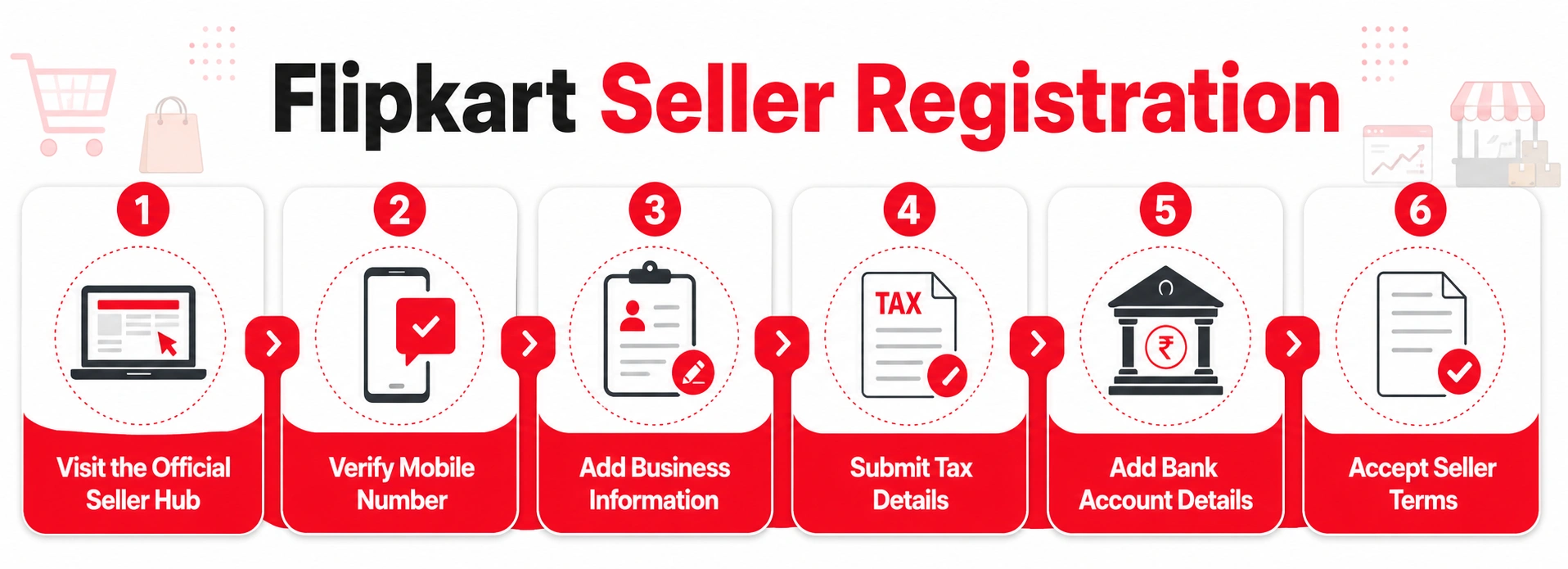
First, register your business. Then, you can learn how to list products on Flipkart Seller Central. Here is the process:
Documents Required:
- Documents: GSTIN (for taxable categories), PAN Card, active bank account, pickup address, email ID, and mobile number.
- Note: Some GST-exempt categories may allow selling without GST registration, depending on Flipkart policies.
Registration Process:
- Visit the Official Seller Hub: Go to the official Flipkart Seller Hub website and click on “Start Selling.”
- Verify Mobile Number: Enter your mobile number and verify it using OTP authentication.
- Add Business Information: Enter your business name, pickup address, business type, and email ID.
- Submit Tax Details: Add GSTIN and PAN information for verification.
- Add Bank Account Details: Provide bank account information to receive payments and settlements.
- Accept Seller Terms: Review the seller agreement carefully before submitting the registration.
Once approved, your seller account becomes active.
Step 2: Understand Flipkart Product Listing Basics
Sellers must learn about Flipkart listing operations before they place their products on the platform. A proper listing enables buyers to discover products with ease. This leads to better chances of making sales.
- What is a Product Listing?: The product listing on Flipkart displays all important product information after a seller uploads an item to the platform. It helps customers understand the product before making a purchase decision. Product details usually include the product title, images, price, specifications, features, description, ratings, and customer reviews. A well-optimized product listing improves product visibility, customer trust, and overall sales performance.
- Types of Product Uploads: Flipkart allows sellers to upload products individually using single product listings or add multiple products together through bulk upload templates, catalog management tools, and API integrations for large inventories.
- Choose the Right Category: Products should always be listed under the most relevant category so customers can easily find them in search results. For example, a wireless Bluetooth headset should be listed under “Electronics > Audio Devices” instead of unrelated categories. Proper category placement improves product visibility and discoverability on Flipkart.
- Listing Quality Counts: Your product visibility improves when you create clear product titles, add accurate specifications, write SEO-friendly descriptions, and use high-resolution images. For example, a smartphone listing with detailed features, multiple clear photos, and competitive pricing is more likely to attract buyers and generate sales.
- Stay Within Flipkart Guidelines: Sellers should follow Flipkart’s product listing policies, image standards, and description guidelines to avoid listing issues or account penalties. For example, using misleading product titles or incorrect product details can lead to product rejection or reduced visibility.
Step 3: How to List Products on Flipkart Seller Central
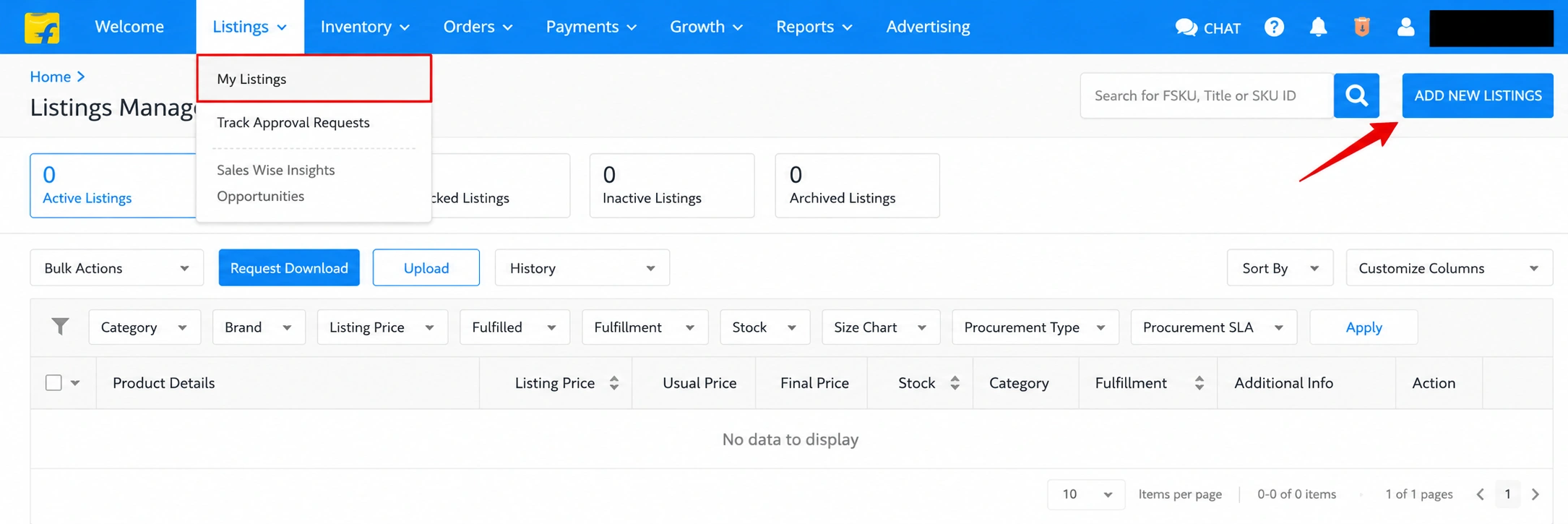
Once logged in, the business can start listing the products. Follow these simple steps for associates to do this properly:
- Sign in to Seller Central: This involves entering the registered mobile number and password for the Flipkart seller dashboard.
- Click on Add New Listing: Head over to Listings, click Add New Product, and get started.
- Pick the Correct Category: Select the precise categorization your product truly falls into. That way, buyers can easily find your product.
- Add Complete Product Details: Enter accurate product information such as the product title, brand name, color, size, material, weight, key features, and technical specifications to help buyers understand the product clearly.
- Write a Detailed Product Description: Create a simple and clear product description explaining the product usage, key features, benefits, material quality, and warranty details (if available) to help customers understand the product easily.
- Upload High-Quality Product Images: Use clear, high-resolution images with a clean background and show the product from multiple angles like front, side, back, and closeup. You can also add lifestyle images to help customers better understand the product and improve conversions. Additionally, you may use AI-generated or AI-enhanced images (where allowed) to improve product presentation, as long as they comply with Flipkart image quality and listing policy guidelines.
- Set Price and Inventory: Enter the product’s selling price, MRP, and available stock quantity, and keep inventory updated regularly to avoid order cancellations and stock issues.
- Select Fulfilment Option: Choose your fulfilment method based on your business needs. You can either use self-shipping or Flipkart fulfilment options such as FBF (Fulfilled by Flipkart), Smart Fulfilment, or Ekart integrated logistics, which help improve delivery speed, order management, and customer satisfaction.
- Click Save and Submit: Review all details once again, then submit the product listing for Flipkart's approval.
Step 4: Submit for Approval
Once you have filled out all product details, your next step is to submit the listing for Flipkart's review. This step ensures that the product meets all platform standards before coming alive.
- Review Your Listing: By way of review, the listing will be checked to verify if your product complies with the platform standards before it gets listed.
- Fix Any Errors: You must correct the errors in any fields to finish all required entries, or you will delay the approval process.
- Verify Your Listing: All details should be verified against the title and description, images, and price.
- Click and Submit: The final step requires clicking the "Save and Submit" button at the bottom of the page.
- Approval Timeframe: Flipkart prefers between 24 and 48 hours for the approval of new listings before they can go live.
- Search for Feedback: The item approval process yields Flipkart giving the specific reason for rejection of your listing. After receiving the feedback, you should rectify issues and resubmit your listing for approval.
Step 5: Track Your Listings and Orders
Once your product is live and operational, it is paramount that you maintain the performance of your product on Flipkart. Seller Central provides a number of useful tools to effortlessly monitor your listings and orders.
- Pick the Listing Tab: This lists all products currently active, inactive, or pending.
- Check Listing Status: Use the Listings section to monitor active products, pending approvals, inactive items, and suppressed listings that may need updates.
- Track Orders in Real Time: The “Orders” tab helps sellers process new orders, track shipments, handle returns, and monitor cancellations in real time.
- Update Product Information: Update Product Information: You can easily update product prices, stock quantity, images, and descriptions anytime from the Seller Hub dashboard.
- View Reports and Analytics: Flipkart provides useful insights such as product views, click-through rates, sales performance, return percentage, and customer feedback to help improve your marketing strategy and product performance.
Note: If managing listings and performance feels complex, you can also get a professional Flipkart account management service to streamline product uploads, order handling, and account optimization.
Single Listing vs Bulk Listing on Flipkart
Single listing is ideal for beginners who upload products manually, while bulk listing is better for large catalogs as it saves time and simplifies product management.
| Feature | Single Listing | Bulk Listing |
| Upload Method | Products are added one by one manually | Multiple products are uploaded together using Excel or catalog templates |
| Best For | Small sellers with fewer products | Large sellers with extensive inventories |
| Time Required | More time-consuming | Faster for bulk product uploads |
| Ease of Use | Simple and beginner-friendly | Requires basic understanding of templates |
| Product Management | Easier for individual updates | Better for managing large catalogs |
| Error Handling | Fewer chances of bulk errors | Template mistakes can affect multiple products |
| Suitable Inventory Size | Limited product inventory | Large-scale product inventory |
| Automation Support | Manual process | Supports catalog tools and API integrations |
Common Mistakes to Avoid While Listing Products on Flipkart
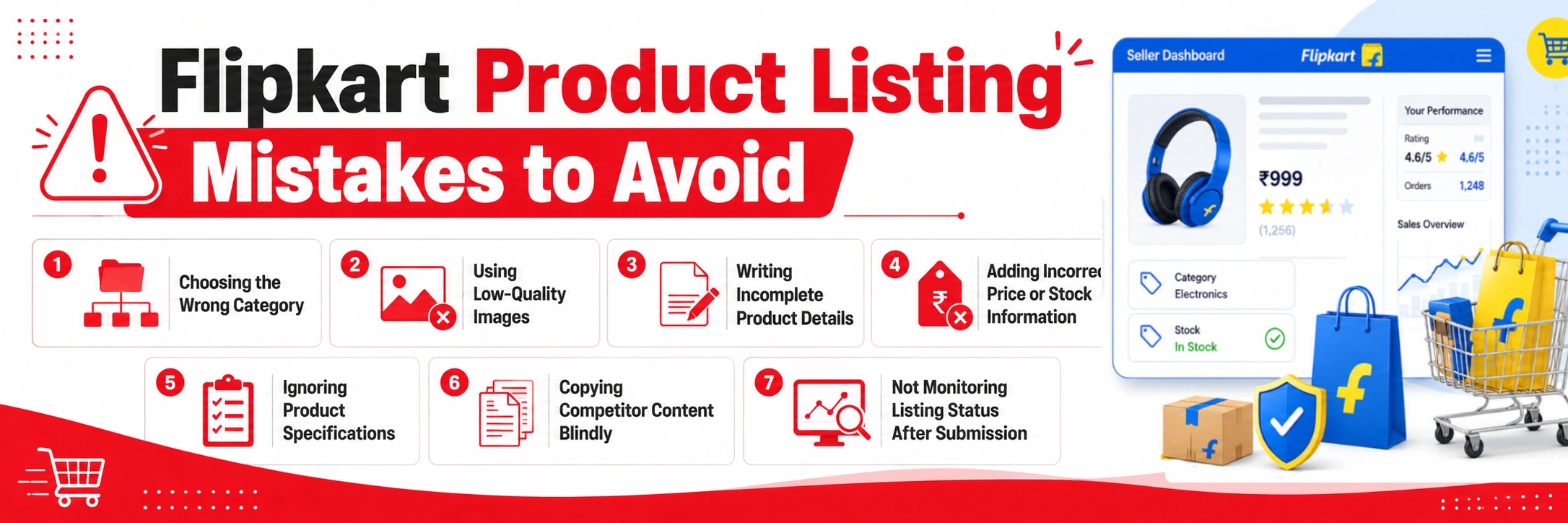
While listing products on Flipkart, sellers often make small mistakes that can affect visibility, sales, and even lead to listing rejection. Avoiding these errors can significantly improve your product performance and customer satisfaction.
1. Choosing the Wrong Category
Placing your product in the wrong category can reduce search visibility and may even result in listing rejection. Always select the most relevant category so customers can easily find your product.
2. Using Low-Quality Images
Blurry, dark, or unclear images reduce buyer trust and lower conversion rates. Always use high-resolution images with proper lighting and a clean background.
3. Writing Incomplete Product Details
Missing important information like size, material, usage, or features can confuse buyers and increase return rates. Provide complete and accurate details to build trust.
4. Adding Incorrect Price or Stock Information
Wrong pricing can lead to financial loss, while incorrect stock updates may result in order cancellations or delays. Always keep pricing and inventory updated in real time.
5. Ignoring Product Specifications
Specifications help customers compare products before buying. Not including them can negatively impact buying decisions and reduce sales chances.
6. Copying Competitor Content Blindly
Copying product titles or descriptions without customization can mislead customers if your product has different features. Always write original and accurate content based on your product.
7. Not Monitoring Listing Status After Submission
After uploading, it is important to regularly check whether your listing is active, pending, or rejected so you can quickly fix any issues and maintain visibility.
Tips to Improve Product Sales on Flipkart (2026)
- Optimize Product Titles: Use relevant and natural keywords in product titles so customers can easily find your products. For example Instead of “Blue Shirt,” use “Men’s Cotton Casual Blue Shirt Full Sleeve.”
- Use Professional Images: Upload high-quality and clear images to build trust and increase conversions.
- Maintain Competitive Pricing: Regularly check competitor prices and offer attractive deals when possible.
- Focus on Customer Reviews: Good reviews improve product ranking, trust, and sales conversion rates.
- Run Flipkart Ads: Sponsored ads help increase visibility and boost sales in competitive categories.
- Maintain Good Seller Performance: Keep cancellation rate, late shipment rate, and return rate low to improve account health.
Conclusion
Learning to list products on Flipkart Seller Central is a key step to becoming a successful online seller. Clear and complete product listings help customers find and trust your products. When done right, each step from registration to order watching can keep an online store running smoothly.
Quality photos of the product, good details, and daily updates help in sales. The seller tools are there to help vendors grow even more. Start small, focus on making a quality product, and keep learning. If done right, selling on Flipkart can attract more customers. It will also help you grow your business across India.